Variables
#What are variables?
Variables give names to values which can then be used to better understand the program better and make it easier to CHANGE a program.
Here’s a value:
5
What the heck does it mean? what units? dollars? feet? inches? meter? gas prices? it can mean anything. If we give it a name by creating a variable:
#The rules for creating a variable are:
(define <SOMENAME> <VALUE>)"Let’s create a few
; its much clear what it 5 means.
(define potion-price 5)
; here's another
(define amount-buying 10)

; we can then use these variables in a calcuation:
(* potion-price amount-buying)
; and it's clear what that calculation means, it's the total

; the rules for evaluatings each variable is that
; they are substitued for the value they hold:
(* potion-price amount-buying)
(* 5 amount-buying) ; step 1
(* 5 10) ; step 2
50 ; finally becomes 50#Practice
Math expressions with variables
#Easier to CHANGE programs
In any given program, there are shared constants, such as the name of your app, the width & height of the screen, etc. You can factor these out into variables making your code much easier to update and change.
Revising Exercise 2:
In Practice Problem 2 with place-image, we centered a + on the middle of an image, but what happens if we CHANGE the size of the empty-scene to width: 400, height: 300?
(require 2htdp/image)
; if we declare constants, it makes it a breeze to CHANGE size
; just CHANGE the WIDTH and HEIGHT lines and everything will adapt

(place-image
 (text "+" 50 "black")
 (/ 400 2) ; CHANGE
 (/ 300 2) ; CHANGE
 (empty-scene 400 300)) ; CHANGE, CHANGE
 ; total 4 changes
The above requires 4 CHANGEs! With variables we can declare constants and only CHANGE 2 places.
(require 2htdp/image)
; if we declare constants, it makes it a breeze to CHANGE size
; just CHANGE the WIDTH and HEIGHT lines and everything will adapt
(define WIDTH 400) ; CHANGE
(define HEIGHT 300) ; CHANGE
(define CENTER-X (/ WIDTH 2))
(define CENTER-Y (/ HEIGHT 2))

(place-image
 (text "+" 50 "black")
 CENTER-X
 CENTER-Y
 (empty-scene WIDTH HEIGHT))
 ; total 2 changes
We could also CHANGE the entire shape by having the width and height be computed with image-width and image-height, making the lines we need to change go down to 1 for this example:
(require 2htdp/image)
; with this we can easily swap out the shape in 1 line:
; it can be any size, rest of the code will just adapt
(define SHAPE (circle 100 "solid" "green")) ; CHANGE

(define WIDTH (image-width SHAPE))
(define HEIGHT (image-width SHAPE))
(define CENTER-X (/ WIDTH 2))
(define CENTER-Y (/ HEIGHT 2))

(place-image
 (text "+" 50 "black")
 CENTER-X
 CENTER-Y
 SHAPE)
 ; total 1 change for this problem
 ; although the (shape)'s width&height can be factored out
Here’s one last example:
; say you are creating a game and at the start of the game you want to greet your users
; if you wanted to CHANGE the name of your game later on to something else, like Asura
; you would have to edit 4 lines(or more):
"Welcome to Eternia"
"Join Server 1 of Eternia"
"Join Server 2 of Eternia"
"Are you sure you want to leave Eternia?"

; we can instead identify the constant information and put it in a variable
; this is sometimes called "(re)factoring"
; by convention constant variable definitions are in all caps
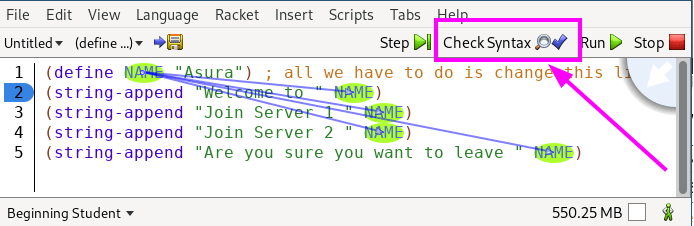
(define NAME "Asura") ; all we have to do is CHANGE this line
(string-append "Welcome to " NAME)
(string-append "Join Server 1 " NAME)
(string-append "Join Server 2 " NAME)
(string-append "Are you sure you want to leave " NAME)
Use the “Check Syntax” button to visualize where variables are being used and where they come from!
#Conclusion
In conclusion, variables give meaningful names to our data making it easier to understand code, and also allow us to make sweeping changes to our program by factoring out similar pieces of data into 1 spot.