Images
Racket has support for drawing images
(require 2htdp/image) ; MANDATORY! IF NOT HERE, IT WONT WORK

; basic shapes
(triangle 100 "solid" "black")
(right-triangle 100 100 "solid" "blue")
(rectangle 200 100 "solid" "red")
(square 100 "solid" "green")
(circle 123 "solid" "orange")

; basic transformations
(rotate 45 (rectangle 200 100 "solid" "red"))
(flip-horizontal (right-triangle 100 100 "solid" "blue"))
(flip-vertical (right-triangle 100 100 "solid" "blue"))

; combining images

(overlay
 (circle 8 "solid" "pink")
 (circle 16 "solid" "blue")
 (circle 24 "solid" "red")
 (circle 32 "solid" "green"))

(above
 (circle 32 "solid" "green")
 (rectangle 5 50 "solid" "brown"))

(beside (rectangle 20 70 "solid" "blue")
        (rectangle 20 50 "solid" "green")
        (rectangle 20 30 "solid" "yellow")
        (rectangle 20 10 "solid" "red"))

; text-images
(text "mcdonalds" 24 "olive")
; different from the string mcdonalds

; image properties
(image-width (rectangle 30 40 "solid" "red"))
(image-height (rectangle 30 40 "solid" "red"))

; you can also paste in your own#Exercise 1.0 to 1.4 Image Shapes
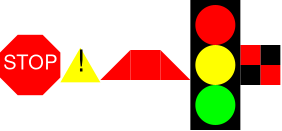
(require 2htdp/image)
; THESE ANSWERS SHOULD RESEMBLE THESE IMAGES RESPECTIVELY:
; https://howtocode.pages.dev/images/shapes.png

; PROBLEM 1: Make a Stop sign using 2htdp/image
; use regular-polygon for the hexagon 🛑
; https://docs.racket-lang.org/teachpack/2htdpimage.html#%28def._%28%28lib._2htdp%2Fimage..rkt%29._regular-polygon%29%29


; PROBLEM 1.1: Make a danger/warning sign with a triangle and an exclamation mark ⚠️


; PROBLEM 1.2: Make a isosoleces trapezoid


; PROBLEM 1.3: Make a traffic light with red, yellow, and green bulbs and a black rectangular background 🚦


; PROBLEM 1.4: Make a red checkerboard pattern
Answer
(require 2htdp/image)
; THESE ANSWERS SHOULD RESEMBLE THESE IMAGES RESPECTIVELY:
; https://howtocode.pages.dev/images/shapes.png

; PROBLEM 1: Make a Stop sign using 2htdp/image
; use regular-polygon for the hexagon 🛑
; https://docs.racket-lang.org/teachpack/2htdpimage.html#%28def._%28%28lib._2htdp%2Fimage..rkt%29._regular-polygon%29%29

(overlay
 (text "STOP" 20 "white")
 (regular-polygon 25 8 "solid" "red"))

; PROBLEM 1.1: Make a danger/warning sign with a triangle and an exclamation mark ⚠️

(overlay
 (text "!" 30 "black")
 (triangle 40 "solid" "yellow"))

; PROBLEM 1.2: Make a isosoleces trapezoid

(beside
 (flip-horizontal (right-triangle 30 30 "solid" "red"))
 (square 30 "solid" "red")
 (right-triangle 30 30 "solid" "red"))

; PROBLEM 1.3: Make a traffic light with red, yellow, and green bulbs and a black rectangular background 🚦

(overlay
 (above
  (circle 20 "solid" "red")
  (circle 20 "solid" "yellow")
  (circle 20 "solid" "green"))
 (rectangle 50 130 "solid" "black"))

 ; PROBLEM 1.4: Make a red checkerboard pattern

(above
 (beside (square 20 "solid" "red") (square 20 "solid" "black"))
 (beside (square 20 "solid" "black") (square 20 "solid" "red")))
#Top Left Origin Practice
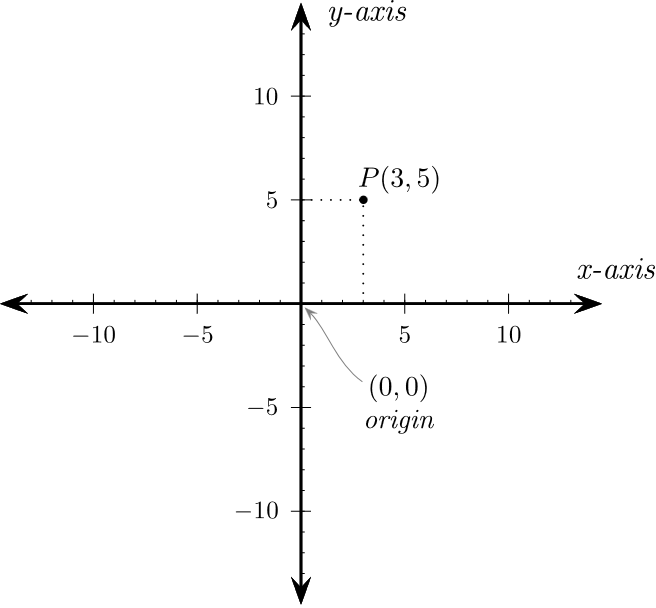
Middle as origin
In all the math you have ever done in school, the origin was in the middle and going:
- ^ up is + positive Y
- v down is - negative Y
Top left as origin
When working with computers, most often 90% of the time it starts from the top left, and the Y axis is inverted!
- ^ up is - negative Y
- v down is + positive Y
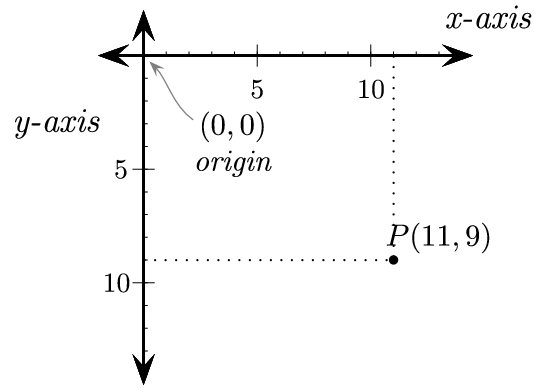
Go to https://www.desmos.com/calculator and drag 0,0 to the top left corner and invert the Y coordinates for more of a visual intution.
Get some practice here by plotting guessing some plot points:
Top left origin practice with plotting points
#Exercise 1.2 place-image center
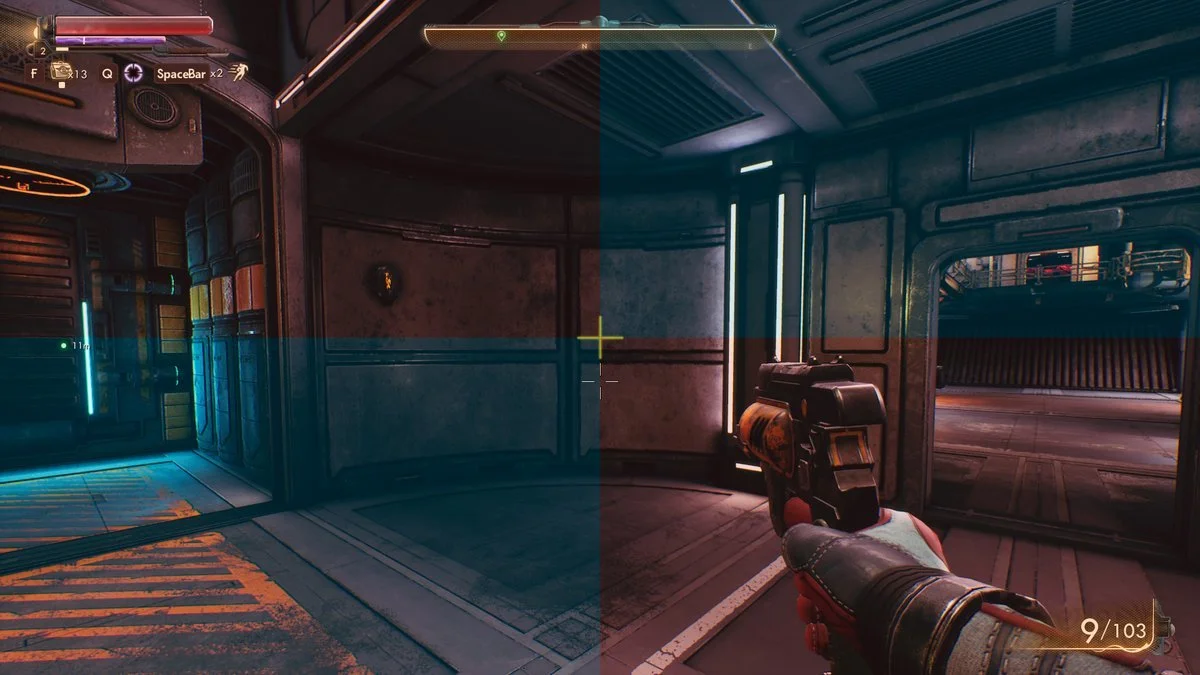
In a lot of 3D shooting games, there are crosshairs to help you aim. Your job is to put the crosshair in the center with place-image
Your result should look like this: with the + centered in the middle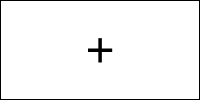
(require 2htdp/image)

;PROBLEM: Use (place-image) to put a crosshair,
; that is the text of a plus +, on the CENTER of this empty-scene
; https://howtocode.pages.dev/images/center_crosshair.png
(text "+" 50 "black")
(empty-scene 200 100)
Answer
(require 2htdp/image)

;PROBLEM: Use (place-image) to put a crosshair,
; that is the text of a plus +, on the CENTER of this empty-scene
; https://howtocode.pages.dev/images/center_crosshair.png

; 100 50 is also a valid solution
; letting racket do the division (/ 200 2) for us is overall better
(place-image
 (text "+" 50 "black")
 (/ 200 2)
 (/ 100 2)
 (empty-scene 200 100))