Tips & Tricks
#Tips for readability
If you are having trouble with counting the parts up in an expression, mouse over parentheses from left to right to count the pieces needed.
Space out and format your code more neatly, like so:
(+ 1 1(* 3 2)(- 5 4)) ; no formatted well

(+ 1 1 (* 3 2) (- 5 4)) ; much easier on the eyes

; a little harder to count
(if #true "I am the true branch >:)" "I am the false branch >:(")

; much easier to see the 3 parts of if
(if #true
    "I am the true branch >:)"
    "I am the false branch >:(")

; hit control+I to auto-format code
Parentheses matter! Be aware of where parentheses wrap around, as it could drastically effect the outcome of a program, aside from creating errors:
(+ 2 (* 6 1 3 9)) ; 164
(+ 2 (* 6 1 3) 9) ; 29
Enable automatic parens is convient because you most often want parentheses in pairs but sometimes it’s not always what you want! For example,
(+ 1 1 * 3 4)) ; just need to add (*

; but instead it will do this:
(+ 1 1 ()* 3 4)) ; so you gotta delete the extra

(+ 1 1 (* 3 4)) ; so you gotta delete the extra closing
It will open and close things in pairs (), "", [] , you can turn this off if you don’t like it, but for me it’s the common case and makes writing code more smooth.
If you delete the starting parens, look to delete the ending one. Think about what each set of parentheses do and where they close and wrap around.
If you type a closing parens ) when there already is a closing parens, racket won’t insert unncessary ones till it reaches the end. It also will auto-match the square ones.
Avoid squaring yourself into a hole by being aware what you need to be doing.
;typing name) will move your cursor right instead of adding a new parens if they're already matching
(defne (greet name) "")#Discovering what is possible
- Right click DrRacket and search docs!
- Keep the docs open and look around BSL docs
#Asking for help
Errors that crash
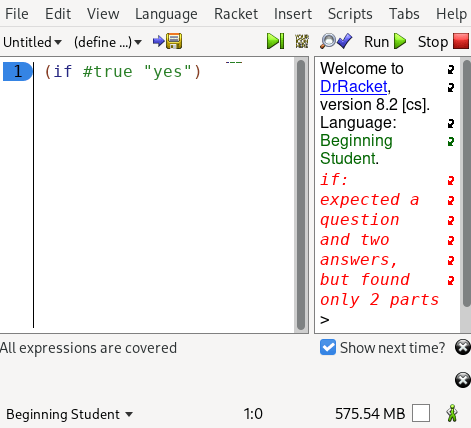
- If it’s a syntax error, spend 1 minute on the cheatsheet and try to make sure your code matches the structure
- Just ask us on discord! Syntax errors are really easy to fix so don’t hesitate https://discord.gg/6Zq8sH5
Logic Errors
- Talk out loud about the problem and where you’re stuck
- Take a break, do the dishes, get your mind off the problem
- Use the stepper
- If all these don’t work, ask us on discord! using this checklist
Copy and paste this into discord and do the checklist before asking for help so we can easily identify which step you’re stuck on:
```scheme
#| FULL DESIGN RECIPE
    Turn all ❌ into ✅ for each step you complete
    1. Data Description ❌
    1B. Data examples❌
    2. Signature, purpose, stub ❌
    3. Examples (aka check-expect, elaborate the concrete) ❌
    4. Template(aka Sketch/Outline) ❌
    5. Code body ❌
    6. Test, review, and refactor(clean up your code! ctrl+i to auto-format) ❌
|#

; <WRITE YOUR CODE HERE> (define foo 1)
```
Overwhelmed
Overwhelmed as to what things are and what they mean?
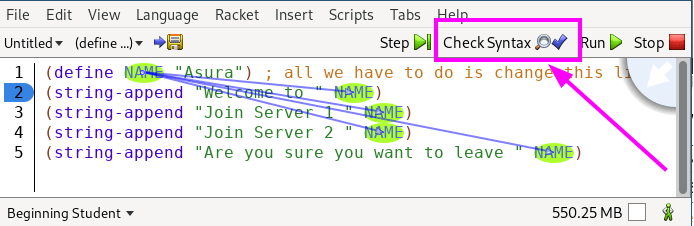
Usecheck-syntaxbutton to find out what things are and where things come from!- Everything eventually boils down to
Numbers, Strings, Booleans, and Images - Look around and read your comments